FALL INTO CCNA

3-MONTH GUIDED EXPERIENCE
Missed Summer of CCNA? We're doing it again! Join us this fall for a guided CCNA study experience built to help you say consistent, practice with confidence, and get exam-ready before Cisco changes the CCNA exam in February. 

Summer of CCNA helped students learn together thorugh lessons, labs, livestreams, and community. Fall into CCNA brings that same energy so you can jump in, stay on track, and study with us all season long. 
Write your awesome label here.

Ebook/Video Lessons

Hands-on Labs

Live Q&A

Community Support

What is Fall into CCNA?
Fall into CCNA is a structured study program for people who want to prepare for the CCNA exam with more accountability, more practice, and more support. You'll follow a guided path of lessons, livestreams, and community-based learning designed to help you make steady progress without studying alone. Whether you are starting fresh or picking up where Summer of CCNA left off, this is your chance to go all in before the exam changes in February. 

LEARN

The skill you need to become a real professional.

PRACTICE

Learn the tools used by the world's top professionals.

STUDY TOGETHER

Boost your confidence, master "the field".

See what the program was like

Watch highlights from Summer of CCNA and get a feel for the lesson, community, and livestream energy. 
  • Real livestream moments
  • Student interaction
  • Program highlights

What's Included

Guide CCNA Content

Follow a structures path of lessons designed to keep your study plan moving

Hands-on Labs

Practice what yo learn in guided lab environments that help turn concepts into real skills

Livestreams with Q&A

Study with us live, ask questions, and stay motivated week after week. 

Practice and Review

Reinforce core concepts and build confidence as you prepare for the exam

Community Support

Connect with other students, share progress, and keep each other moving forward

Replay access

Catch up when life gets busy and revisit key sessions as needed

Learn with people doing the same work

Studying alone makes it easy to stay stuck or quietly lose momentum. The Fall Into CCNA community gives upgraded learners a dedicated place to continue the work between lessons and live sessions.

CONNECT

Ask questions when a lesson or lab is unclear

COLLABORATE

Compare troubleshooting approaches

STAY ACCOUNTABLE

Share progress and weekly milestones

BELONG

Find encouragement when the material gets difficul

Join for the content.  Stay for the relationships. 

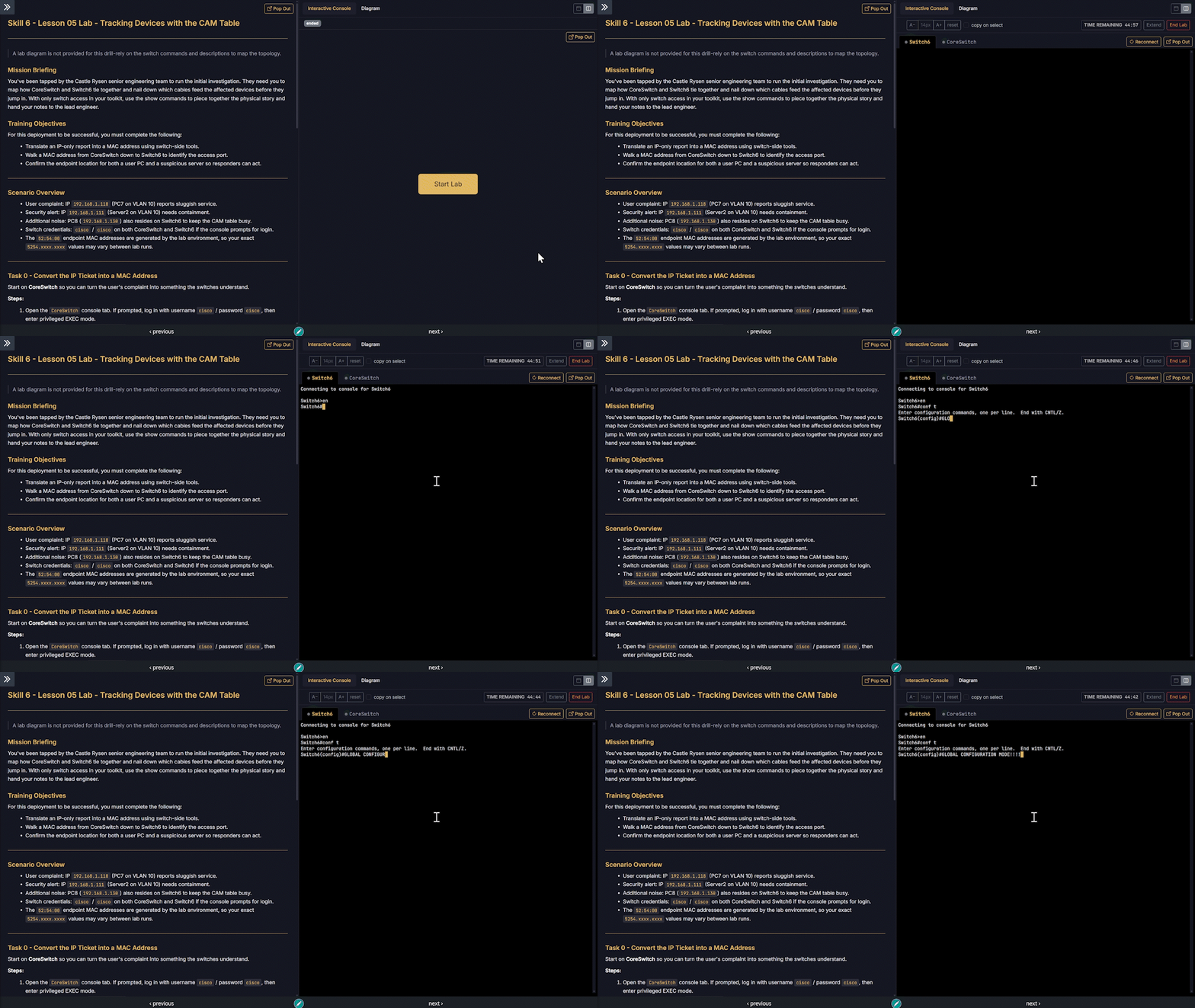
YOU GOTTA TRY THE LABS

Training is powerful on its own, but real transformation happens when you apply what you learn by getting your hands on the keyboard and following along.

With our labs you'll work on:

  • Real Cisco operating systems (not simulations)
  • Real-world scenarios used in actual environments
  • Guided configuration exercises
  • Troubleshooting scenarios
  • Browser-based labs with no downloads or setup
The labs give you a place to configure systems, make mistakes, troubleshoot problems, and apply what you learned.

Cisco Labs powered by: 

See How Fall Into CCNA Works

Explore what you’ll study, how each week is structured, where you’ll practice, and how you’ll learn with the community.

Week 01
Week 02
Week 03
Week 04
Week 05
Week 06
Week 07
Week 08
Week 09
Week 10
Week 11
Week 12
Week 13
==================== WEEK 01 ====================

Week 01: Packet Tracer, Network Fundamentals & Cabling

SEP 14 — Getting Started with Packet Tracer

  • Skill 01 Lesson 00 - Why This Skill is Important
  • QuizSkill 01 Lesson 00 - Quiz 1
  • Skill 01 Lesson 01 - Installing Packet Tracer
  • QuizSkill 01 Lesson 01 - Quiz 4
  • Skill 01 Lesson 02 - Building Your First Network
  • QuizSkill 01 Lesson 02 - Quiz 3
  • Skill 01 Lesson 03 - First Essential Packet Tracer Functions
  • QuizSkill 01 Lesson 03 - Quiz 5

SEP 15 — Understanding the Network

  • Skill 01 Lesson 04 - What Now?
  • QuizSkill 01 Lesson 04 - Quiz 3
  • Skill 02 Lesson 00 - Why This Skill is Important
  • QuizSkill 02 Lesson 00 - Quiz 1
  • Skill 02 Lesson 01 - Castle Rysen Coffee RFP Overview
  • QuizSkill 02 Lesson 01 - Quiz 2
  • Skill 02 Lesson 02 - LAN VS. WAN
  • QuizSkill 02 Lesson 02 - Quiz 5

SEP 16 — Network Devices & Infrastructure

  • Skill 02 Lesson 02.1 - Staging the Network Equipment
  • QuizSkill 02 Lesson 02.1 - Quiz 4
  • Skill 02 Lesson 03 - Client & Servers
  • QuizSkill 02 Lesson 03 - Quiz 2
  • Skill 02 Lesson 04 - Switching & Wireless
  • QuizSkill 02 Lesson 04 - Quiz 3
  • Skill 02 Lesson 05 - Router & Firewall
  • QuizSkill 02 Lesson 05 - Quiz 3

SEP 17 — Network Models & Standards

  • Skill 02 Lesson 06 - What Now?
  • QuizSkill 02 Lesson 06 - Quiz 1
  • Skill 03 Lesson 00 - Why This Skill is Important
  • QuizSkill 03 Lesson 00 - Quiz 2
  • Skill 03 Lesson 01 - The Importance of Network Standards
  • QuizSkill 03 Lesson 01 - Quiz 4
  • Skill 03 Lesson 02 - Determine Speed with Bits and Bytes
  • QuizSkill 03 Lesson 02 - Quiz 3

SEP 18 — Cabling & Network Diagrams

  • Skill 03 Lesson 03 - Copper Cabling Standards and Characteristics
  • QuizSkill 03 Lesson 03 - Quiz 5
  • Skill 03 Lesson 04 - Using Straight-through, Crossover, and MDI-X
  • QuizSkill 03 Lesson 04 - Quiz 3
  • Skill 03 Lesson 05 - Understanding the Fiber Optic Cable Spectrum
  • QuizSkill 03 Lesson 05 - Quiz 3
  • Skill 03 Lesson 06 - Creating a Network Diagram
  • QuizSkill 03 Lesson 06 - Quiz 3
==================== WEEK 02 ====================

Week 02: Network Models, Cisco IOS & Device Configuration

SEP 21 — Physical Networking & Packet Tracer

  • Skill 03 Lesson 07 - Physically Connecting the Coffee House
  • QuizSkill 03 Lesson 07 - Quiz 4
  • Skill 03 Lesson 08 - The Packet Tracer Coffee House
  • QuizSkill 03 Lesson 08 - Quiz 3
  • Skill 03 Lesson 09 - What Now?
  • QuizSkill 03 Lesson 09 - Quiz 3
  • Skill 04 Lesson 00 - Why This Skill is Important
  • QuizSkill 04 Lesson 00 - Quiz 1

SEP 22 — OSI, TCP/IP & Network Design Models

  • Skill 04 Lesson 01 - The OSI vs. TCP/IP Model
  • QuizSkill 04 Lesson 01 - Quiz 3
  • Skill 04 Lesson 02 - Describing Network Communication with Models
  • QuizSkill 04 Lesson 02 - Quiz 2
  • Skill 04 Lesson 03 - Network Design Models - Three Tiered
  • QuizSkill 04 Lesson 03 - Quiz 4
  • Skill 04 Lesson 04 - Castle Rysen Network Design
  • QuizSkill 04 Lesson 04 - Quiz 4

SEP 23 — Cisco IOS & Console Access

  • Skill 04 Lesson 05 - What Now?
  • QuizSkill 04 Lesson 05 - Quiz 3
  • Skill 05 Lesson 00 - Why This Skill is Important
  • QuizSkill 05 Lesson 00 - Quiz 1
  • Skill 05 Lesson 01 - Setting Up Console Connections
  • QuizSkill 05 Lesson 01 - Quiz 2
  • Skill 05 Lesson 02 - Navigating the Cisco IOS Software
  • LabSkill 05 Lab - Navigating the Cisco IOS (S05-L02)
  • QuizSkill 05 Lesson 02 - Quiz 4

SEP 24 — Cisco Boot Process & Base Configuration

  • Skill 05 Lesson 03 - Examining the Cisco Device Boot Process
  • QuizSkill 05 Lesson 03 - Quiz 4
  • Skill 05 Lesson 04 - Implementing a Cisco Base Configuration
  • LabSkill 05 Lab - Implementing the Cisco Base Configuration (S05-L04)
  • QuizSkill 05 Lesson 04 - Quiz 4

SEP 25 — Saving Configurations & Switch Bring-Up

  • Skill 05 Lesson 05 - Saving or Resetting Cisco Configurations
  • LabSkill 05 Lab - Saving or Resetting Cisco Configurations (S05-L05)
  • QuizSkill 05 Lesson 05 - Quiz 4
  • Skill 05 Lesson 06 - What Now?
  • LabSkill 05 Lab - District Shop Bring-Up (S05-SL01)
  • QuizSkill 05 Lesson 06 - Quiz 2
  • Skill 06 Lesson 00 - Why This Skill is Important
  • QuizSkill 06 Lesson 00 - Quiz 1
==================== WEEK 03 ====================

Week 03: MAC Addressing, IP Addressing & Interfaces

SEP 28 — MAC Addresses, Frames & Switching

  • Skill 06 Lesson 01 - Understanding MAC Addresses and Frames
  • QuizSkill 06 Lesson 01 - Quiz 5
  • Skill 06 Lesson 02 - Switch Port Numbering and CAM Table
  • LabSkill 06 Lab - Tracking Switch Interfaces and the CAM Table
  • QuizSkill 06 Lesson 02 - Quiz 3
  • Skill 06 Lesson 03 - How Switches Do What They Do
  • QuizSkill 06 Lesson 03 - Quiz 4

SEP 29 — CAM Tables & Device Tracking

  • Skill 06 Lesson 04 - Exploring MAC Address Tables on a Cisco Switch
  • LabSkill 06 Lab - Exploring Switch CAM Tables (S06-L04)
  • QuizSkill 06 Lesson 04 - Quiz 4
  • Skill 06 Lesson 05 - YOUR TURN - Using CAM Table to Track Down
  • LabSkill 06 Lab - Tracking Devices with the CAM Table (S06-L05)
  • QuizSkill 06 Lesson 05 - Quiz 2

SEP 30 — Switch Recon & IP Addressing

  • Skill 06 Lesson 06 - What Now?
  • LabSkill 06 Lab - Roastery West Switch Recon (S06-SL01)
  • QuizSkill 06 Lesson 06 - Quiz 1
  • Skill 07 Lesson 00 - Why This Skill is Important
  • QuizSkill 07 Lesson 00 - Quiz 2
  • Skill 07 Lesson 01 - IP Addresses...Why Do We Need Them?
  • QuizSkill 07 Lesson 01 - Quiz 6

OCT 01 — Subnet Masks & IP Address Planning

  • Skill 07 Lesson 02 - Defining Networks with Subnet Masks
  • QuizSkill 07 Lesson 02 - Quiz 5
  • Skill 07 Lesson 03 - Private and Public IP Addresses
  • QuizSkill 07 Lesson 03 - Quiz 4
  • Skill 07 Lesson 04 - Initial Addressing of Castle Rysen
  • QuizSkill 07 Lesson 04 - Quiz 3
  • Skill 07 Lesson 05 - What Now?
  • QuizSkill 07 Lesson 05 - Quiz 3

OCT 02 — Configuring Switch & Router Interfaces

  • Skill 08 Lesson 00 - Why This Skill is Important
  • QuizSkill 08 Lesson 00 - Quiz 1
  • Skill 08 Lesson 01 - Configuring Switch Interfaces
  • LabSkill 08 Lab - Configuring Switch Interfaces (S08-L01)
  • QuizSkill 08 Lesson 01 - Quiz 3
  • Skill 08 Lesson 02 - Configuring Router Interfaces
  • LabSkill 08 Lab - Configuring Router Interfaces (S08-L02)
  • QuizSkill 08 Lesson 02 - Quiz 5
==================== WEEK 04 ====================

Week 04: Routing

OCT 05 — Interface Counters & Speed

  • Skill 08 Lesson 03 - Understanding Basic Interface Counters
  • LabSkill 08 Lab - Reading Interface Counters (S08-L03)
  • QuizSkill 08 Lesson 03 - Quiz 3
  • Skill 08 Lesson 04 - Understanding Interface Speed
  • QuizSkill 08 Lesson 04 - Quiz 3

OCT 06 — Why Routers Exist

  • Skill 08 Lesson 05 - What Now?
  • LabSkill 08 Lab - Coffee House Fallout Local Routing (S08-SL01)
  • QuizSkill 08 Lesson 05 - Quiz 1
  • Skill 09 Lesson 00 - Why This Skill Exists
  • QuizSkill 09 Lesson 00 - Quiz 2
  • Skill 09 Lesson 01 - Review, Why Routers Exist
  • QuizSkill 09 Lesson 01 - Quiz 3

OCT 07 — Local, Static & Default Routing

  • Skill 09 Lesson 02 - Configuring Local Routing
  • LabSkill 09 Lab - Configuring Local Routing (S09-L02)
  • QuizSkill 09 Lesson 02 - Quiz 4
  • Skill 09 Lesson 03 - Configuring Static Routing
  • LabSkill 09 Lab - Configuring Static Routing (S09-L03)
  • QuizSkill 09 Lesson 03 - Quiz 3
  • Skill 09 Lesson 04 - Configuring Default Routing
  • LabSkill 09 Lab - Configuring Default Routing (S09-L04)
  • QuizSkill 09 Lesson 04 - Quiz 5

OCT 08 — Dynamic Routing & Route Selection

  • Skill 09 Lesson 05 - Configuring Dynamic Routing
  • LabSkill 09 Lab - Configuring EIGRP Dynamic Routing (S09-L05)
  • QuizSkill 09 Lesson 05 - Quiz 4
  • Skill 09 Lesson 06 - Routing Table Concepts and Route Selection
  • LabSkill 09 Lab - Routing Table Concepts and Route Selection (S09-L06)
  • QuizSkill 09 Lesson 06 - Quiz 5

OCT 09 — Documenting & Deploying Routed Networks

  • Skill 09 Lesson 07 - Documenting the Routed Network
  • QuizSkill 09 Lesson 07 - Quiz 4
  • Skill 09 Lesson 08 - What Now?
  • LabSkill 09 Lab - Static and Default Internet Routing (S09-SL01)
  • QuizSkill 09 Lesson 08 - Quiz 1
  • Skill 10 Lesson 00 - Why This Skill Exists
  • QuizSkill 10 Lesson 00 - Quiz 1
==================== WEEK 05 ====================

Week 05: NAT & Subnetting

OCT 12 — NAT Fundamentals & Internet Connectivity

  • Skill 10 Lesson 01 - How NAT Works
  • QuizSkill 10 Lesson 01 - Quiz 4
  • Skill 10 Lesson 02 - Adding THE INTERNET to Packet Tracer
  • LabSkill 10 Lab - Adding THE INTERNET (S10-L02)
  • QuizSkill 10 Lesson 02 - Quiz 4
  • Skill 10 Lesson 03 - The Cisco NAT Terminology
  • QuizSkill 10 Lesson 03 - Quiz 5

OCT 13 — Static & Dynamic NAT

  • Skill 10 Lesson 04 - Configuring Static NAT
  • LabSkill 10 Lab - Configuring Static NAT (S10-L04)
  • QuizSkill 10 Lesson 04 - Quiz 4
  • Skill 10 Lesson 05 - Configuring Dynamic NAT
  • LabSkill 10 Lab - Configuring Dynamic NAT (S10-L05)
  • QuizSkill 10 Lesson 05 - Quiz 4

OCT 14 — NAT Overload & Subnetting Fundamentals

  • Skill 10 Lesson 06 - Configuring NAT Overload
  • LabSkill 10 Lab - Configuring NAT Overload (S10-L06)
  • QuizSkill 10 Lesson 06 - Quiz 5
  • Skill 10 Lesson 07 - Where We Are Now
  • LabSkill 10 Lab - Configuring Basic NAT (S10-SL01)
  • QuizSkill 10 Lesson 07 - Quiz 1
  • Skill 11 Lesson 00 - Why This Skill Exists
  • QuizSkill 11 Lesson 00 - Quiz 4

OCT 15 — Binary & Class C Subnetting

  • Skill 11 Lesson 01 - What is Subnetting?
  • QuizSkill 11 Lesson 01 - Quiz 4
  • Skill 11 Lesson 02 - Converting Decimal to Binary
  • QuizSkill 11 Lesson 02 - Quiz 5
  • Skill 11 Lesson 03 - Three Steps to Class C Subnetting
  • QuizSkill 11 Lesson 03 - Quiz 4

OCT 16 — Class A/B Subnetting & Practice

  • Skill 11 Lesson 04 - Three Steps to Class B and A Subnetting
  • QuizSkill 11 Lesson 04 - Quiz 5
  • Skill 11 Lesson 05 - Subnetting Based on Host Requirements
  • QuizSkill 11 Lesson 05 - Quiz 4
  • Skill 11 Lesson 06 - Subnetting Practice
  • QuizSkill 11 Lesson 06 - Quiz 1
  • Skill 11 Lesson 06.3 - Network Subnetting Practice
  • QuizSkill 11 Lesson 06.3 - Quiz 1
==================== WEEK 06 ====================

Week 06: Subnetting & VLANs

OCT 19 — Reverse Engineering Masks & VLSM

  • Skill 11 Lesson 06.5 - Reverse Engineering a Mask
  • QuizSkill 11 Lesson 06.5 - Quiz 4
  • Skill 11 Lesson 07 - Variable Length Subnet Masking
  • QuizSkill 11 Lesson 07 - Quiz 2
  • Skill 11 Lesson 08 - Re-addressing Castle Rysen Coffee
  • QuizSkill 11 Lesson 08 - Quiz 3

OCT 20 — Subnet Strategy & VLAN Fundamentals

  • Skill 11 Lesson 08.5 - Applying New Castle Rysen Subnet Strategy
  • QuizSkill 11 Lesson 08.5 - Quiz 3
  • Skill 11 Lesson 09 - Where We Are Now
  • QuizSkill 11 Lesson 09 - Quiz 2
  • Skill 12 Lesson 00 - Why We Need This Skill
  • QuizSkill 12 Lesson 00 - Quiz 1
  • Skill 12 Lesson 01 - Why We Need VLANS
  • QuizSkill 12 Lesson 01 - Quiz 3

OCT 21 — Creating VLANs & Trunks

  • Skill 12 Lesson 02 - Creating and Naming VLANS
  • LabSkill 12 Lab - Creating and Naming VLANS (S12-L02)
  • QuizSkill 12 Lesson 02 - Quiz 4
  • Skill 12 Lesson 03 - Using Trunks to Extend VLANS
  • LabSkill 12 Lab - Using Trunks to Extend VLANS (S12-L03)
  • QuizSkill 12 Lesson 03 - Quiz 4

OCT 22 — Inter-VLAN Routing & Trunk Security

  • Skill 12 Lesson 04 - Routing Between VLANS
  • LabSkill 12 Lab - Routing Between VLANS (S12-L04)
  • QuizSkill 12 Lesson 04 - Quiz 4
  • Skill 12 Lesson 05 - Avoiding DTP and VTP
  • LabSkill 12 Lab - Locking Down Legacy Trunk Protocols (S12-L05)
  • QuizSkill 12 Lesson 05 - Quiz 4
  • Skill 12 Lesson 06 - The Purpose of the Native VLAN
  • LabSkill 12 Lab - The Purpose of the Native VLAN (S12-L06)
  • QuizSkill 12 Lesson 06 - Quiz 5

OCT 23 — Building the Castle Rysen VLAN Network

  • Skill 12 Lesson 07 - Building the Fallout Shelter Network
  • QuizSkill 12 Lesson 07 - Quiz 6
  • Skill 12 Lesson 08 - Castle Rysen Cafe VLAN Implementation
  • LabSkill 12 Lab - Castle Rysen Cafe VLAN Implementation (S12-L08)
  • QuizSkill 12 Lesson 08 - Quiz 5
==================== WEEK 07 ====================

Week 07: VLANs, Spanning Tree & EtherChannel

OCT 26 — VLAN Deployment & Spanning Tree

  • Skill 12 Lesson 09 - Castle Rysen Fallout Shelter VLAN
  • LabSkill 12 Lab - Castle Rysen Fallout Shelter VLAN Implementation
  • QuizSkill 12 Lesson 09 - Quiz 4
  • Skill 12 Lesson 10 - What Now?
  • LabSkill 12 Lab - Fortifying the Shelter VLAN Core (S12-SL01)
  • QuizSkill 12 Lesson 10 - Quiz 1
  • Skill 13 Lesson 00 - Why We Need This Skill
  • QuizSkill 13 Lesson 00 - Quiz 2

OCT 27 — Spanning Tree Fundamentals

  • Skill 13 Lesson 01 - Why We Need STP
  • QuizSkill 13 Lesson 01 - Quiz 4
  • Skill 13 Lesson 02 - Key STP Concepts, Simplified
  • QuizSkill 13 Lesson 02 - Quiz 3
  • Skill 13 Lesson 03 - Three Rules for STP Port Selections
  • QuizSkill 13 Lesson 03 - Quiz 3

OCT 28 — STP, RSTP, PortFast & BPDU Guard

  • Skill 13 Lesson 04 - Port States and STP Configuration
  • LabSkill 13 Lab - Port States and STP Configuration (S13-L04)
  • QuizSkill 13 Lesson 04 - Quiz 4
  • Skill 13 Lesson 05 - Rapid and Multiple Spanning Tree
  • LabSkill 13 Lab - Rapid and Multiple Spanning Tree (S13-L05)
  • QuizSkill 13 Lesson 05 - Quiz 5
  • Skill 13 Lesson 06 - The Place of PortFast and BPDU Guard
  • LabSkill 13 Lab - The Place of PortFast and BPDU Guard (S13-L06)
  • QuizSkill 13 Lesson 06 - Quiz 5

OCT 29 — Deploying Spanning Tree

  • Skill 13 Lesson 07 - Configuring STP in Castle Rysen
  • LabSkill 13 Lab - Configuring STP in Castle Rysen (S13-L07)
  • QuizSkill 13 Lesson 07 - Quiz 4
  • Skill 13 Lesson 08 - What Now?
  • LabSkill 13 Lab - Deploying Spanning Tree Protocol Loop Prevention
  • QuizSkill 13 Lesson 08 - Quiz 2

OCT 30 — EtherChannel & LACP

  • Skill 14 Lesson 00 - Why We Need This Skill
  • QuizSkill 14 Lesson 00 - Quiz 1
  • Skill 14 Lesson 01 - How EtherChannel Increases Bandwidth
  • QuizSkill 14 Lesson 01 - Quiz 3
  • Skill 14 Lesson 02 - Configuring EtherChannel with LACP
  • LabSkill 14 Lab - Configuring EtherChannel with LACP (S14-L02)
  • QuizSkill 14 Lesson 02 - Quiz 5
==================== WEEK 08 ====================

Week 08: EtherChannel & OSPF

NOV 02 — EtherChannel Load Balancing & Deployment

  • Skill 14 Lesson 03 - Tuning EtherChannel Load Balancing
  • LabSkill 14 Lab - Tuning EtherChannel Load Balancing (S14-L03)
  • QuizSkill 14 Lesson 03 - Quiz 3
  • Skill 14 Lesson 04 - Deploying EtherChannel at Castle Rysen Coffee
  • LabSkill 14 Lab - Deploying EtherChannel at Castle Rysen Coffee
  • QuizSkill 14 Lesson 04 - Quiz 4

NOV 03 — Routing Protocol Fundamentals

  • Skill 14 Lesson 05 - What Now?
  • LabSkill 14 Lab - Increasing Bandwidth Using EtherChannel (S14-SL01)
  • QuizSkill 14 Lesson 05 - Quiz 1
  • Skill 15 Lesson 00 - Why is This Important?
  • QuizSkill 15 Lesson 00 - Quiz 2
  • Skill 15 Lesson 01 - Advantages of Using Routing Protocols
  • QuizSkill 15 Lesson 01 - Quiz 3

NOV 04 — Routing Protocol Selection & Network Commands

  • Skill 15 Lesson 02 - Categories of Routing Protocols
  • QuizSkill 15 Lesson 02 - Quiz 5
  • Skill 15 Lesson 03 - How Routing Protocols Find The Best Way
  • QuizSkill 15 Lesson 03 - Quiz 5
  • Skill 15 Lesson 04 - Understanding The Network Command
  • LabSkill 15 Lab - Understanding the Network Command (S15-L04)
  • QuizSkill 15 Lesson 04 - Quiz 5

NOV 05 — Deploying & Troubleshooting OSPF

  • Skill 15 Lesson 05 - Castle Rysen - Implementing OSPF Routing
  • LabSkill 15 Lab - Castle Rysen: Implementing OSPF Routing Protocol
  • QuizSkill 15 Lesson 05 - Quiz 5
  • Skill 15 Lesson 06 - OSPF Communication Troubleshooting
  • LabSkill 15 Lab - Castle Rysen: OSPF Communication Troubleshooting
  • QuizSkill 15 Lesson 06 - Quiz 5
  • Skill 15 Lesson 07 - Castle Rysen - Scaling OSPF to Larger Networks
  • LabSkill 15 Lab - Castle Rysen: Scaling OSPF for the Fallout Grid
  • QuizSkill 15 Lesson 07 - Quiz 5

NOV 06 — OSPF Deployment & First Hop Redundancy

  • Skill 15 Lesson 08 - Where We Are Now
  • LabSkill 15 Lab - Deploying the OSPF Routing Protocol (S15-SL01)
  • QuizSkill 15 Lesson 08 - Quiz 2
  • Skill 16 Lesson 00 - Why is This Important?
  • QuizSkill 16 Lesson 00 - Quiz 2
==================== WEEK 09 ====================

Week 09: FHRPs, IPv6 & ACLs

NOV 09 — FHRPs & HSRPv2

  • Skill 16 Lesson 01 - When to Use First Hop Redundancy Protocols
  • QuizSkill 16 Lesson 01 - Quiz 5
  • Skill 16 Lesson 02 - Flavors of FHRPs
  • QuizSkill 16 Lesson 02 - Quiz 5
  • Skill 16 Lesson 03 - Castle Rysen - Configuring HSRPv2
  • LabSkill 16 Lab - Castle Rysen: Configuring HSRPv2 (S16-L03)
  • QuizSkill 16 Lesson 03 - Quiz 3

NOV 10 — HSRP Deployment & IPv6 Fundamentals

  • Skill 16 Lesson 04 - What Now?
  • LabSkill 16 Lab - Deploying First Hop Redundancy Protocols (S16-SL01)
  • QuizSkill 16 Lesson 04 - Quiz 4
  • Skill 17 Lesson 00 - Why is This Important?
  • QuizSkill 17 Lesson 00 - Quiz 2
  • Skill 17 Lesson 01 - IPv6, the Speedway Protocol
  • QuizSkill 17 Lesson 01 - Quiz 3

NOV 12 — IPv6 Addressing & Configuration

  • Skill 17 Lesson 02 - IPv6 Address Shortcuts
  • QuizSkill 17 Lesson 02 - Quiz 5
  • Skill 17 Lesson 03 - Configuring IPv6 Overlay at Castle Rysen Cafe
  • LabSkill 17 Lab - Configuring IPv6 Overlay at Castle Rysen Cafe
  • QuizSkill 17 Lesson 03 - Quiz 3
  • Skill 17 Lesson 04 - Configuring IPv6 at Castle Rysen
  • LabSkill 17 Lab - Configuring IPv6 at Castle Rysen Fallout Shelter
  • QuizSkill 17 Lesson 04 - Quiz 5

NOV 13 — IPv6 Deployment & ACL Fundamentals

  • Skill 17 Lesson 05 - What Now?
  • LabSkill 17 Lab - IPv6 Overlay Activation for Castle Rysen Field Sites
  • QuizSkill 17 Lesson 05 - Quiz 2
  • Skill 18 Lesson 00 - Why is This Important?
  • QuizSkill 18 Lesson 00 - Quiz 3
  • Skill 18 Lesson 01 - Five Most Common ACL Purposes
  • QuizSkill 18 Lesson 01 - Quiz 4
==================== WEEK 10 ====================

Week 10: ACLs & Network Security

NOV 16 — Standard & Extended ACLs

  • Skill 18 Lesson 02 - Standard ACL Configuration
  • LabSkill 18 Lab - Standard ACL Configuration at Castle Rysen (S18-L02)
  • QuizSkill 18 Lesson 02 - Quiz 4
  • Skill 18 Lesson 03 - Extended ACL Configuration
  • LabSkill 18 Lab - Extended ACL Deep Dive (S18-L03)
  • QuizSkill 18 Lesson 03 - Quiz 4

NOV 17 — Deploying Access Control & Security Fundamentals

  • Skill 18 Lesson 04 - Deploying Access Control at Castle Rysen
  • LabSkill 18 Lab - Deploying Access Control at Castle Rysen (S18-L04)
  • QuizSkill 18 Lesson 04 - Quiz 4
  • Skill 18 Lesson 05 - What Now?
  • LabSkill 18 Lab - Consolidating Castle Cafe Access Control (S18-SL01)
  • QuizSkill 18 Lesson 05 - Quiz 2
  • Skill 19 Lesson 00 - Why is This Important?
  • QuizSkill 19 Lesson 00 - Quiz 1

NOV 18 — Threats, Vulnerabilities & Attacks

  • Skill 19 Lesson 01 - Understanding Vulnerabilities, Exploits, and
  • QuizSkill 19 Lesson 01 - Quiz 4
  • Skill 19 Lesson 02 - Understanding Types of Security Threats
  • QuizSkill 19 Lesson 02 - Quiz 3
  • Skill 19 Lesson 03 - Understanding Identity and Password Attacks
  • QuizSkill 19 Lesson 03 - Quiz 3

NOV 19 — AAA & Switch Port Security

  • Skill 19 Lesson 04 - Understanding the Place of Cisco AAA
  • QuizSkill 19 Lesson 04 - Quiz 4
  • Skill 19 Lesson 05 - What Now?
  • QuizSkill 19 Lesson 05 - Quiz 1
  • Skill 20 Lesson 00 - Why is This Important?
  • QuizSkill 20 Lesson 00 - Quiz 1
  • Skill 20 Lesson 01 - Configuring Switch Port Security
  • LabSkill 20 Lab - Configuring Switch Port Security (S20-L01)
  • QuizSkill 20 Lesson 01 - Quiz 5

NOV 20 — DHCP Snooping & Dynamic ARP Inspection

  • Skill 20 Lesson 02 - Configuring DHCP Snooping
  • LabSkill 20 Lab - Configuring DHCP Snooping (S20-L02)
  • QuizSkill 20 Lesson 02 - Quiz 5
  • Skill 20 Lesson 03 - Configuring DAI
  • LabSkill 20 Lab - Configuring DAI (S20-L03)
  • QuizSkill 20 Lesson 03 - Quiz 4
==================== WEEK 11 ====================

Week 11: Layer 2 Security, Discovery Protocols & Time

NOV 23 — Layer 2 Security Deployment

  • Skill 20 Lesson 04 - Castle Rysen Layer 2 Security Deployment
  • LabSkill 20 Lab - Castle Rysen Layer 2 Security Deployment (S20-L04)
  • QuizSkill 20 Lesson 04 - Quiz 4
  • Skill 20 Lesson 05 - What Now?
  • LabSkill 20 Lab - Fortifying Shelter Layer 2 Defenses (S20-SL01)
  • QuizSkill 20 Lesson 05 - Quiz 1

NOV 24 — CDP & LLDP

  • Skill 21 Lesson 00 - Why is This Important?
  • QuizSkill 21 Lesson 00 - Quiz 1
  • Skill 21 Lesson 01 - Using Cisco Discovery Protocol
  • LabSkill 21 Lab - Using Cisco Discovery Protocol (S21-L01)
  • QuizSkill 21 Lesson 01 - Quiz 4
  • Skill 21 Lesson 02 - Using Link Layer Discovery Protocol
  • LabSkill 21 Lab - Using Link Layer Discovery Protocol (S21-L02)
  • QuizSkill 21 Lesson 02 - Quiz 5

NOV 25 — Network Discovery & Cisco Clock Configuration

  • Skill 21 Lesson 03 - What Now?
  • LabSkill 21 Lab - Field Discovery Safeguards (S21-SL01)
  • QuizSkill 21 Lesson 03 - Quiz 1
  • Skill 22 Lesson 00 - Why is This Important?
  • QuizSkill 22 Lesson 00 - Quiz 1
  • Skill 22 Lesson 01 - Manually Setting Cisco Clocks
  • LabSkill 22 Lab - Manually Setting Cisco Clocks (S22-L01)
  • QuizSkill 22 Lesson 01 - Quiz 5
==================== WEEK 12 ====================

Week 12: IP Services, SNMP & Syslog

NOV 30 — NTP & DNS Services

  • Skill 22 Lesson 02 - Setting the Clock with NTP
  • LabSkill 22 Lab - Setting the Clock with NTP (S22-L02)
  • QuizSkill 22 Lesson 02 - Quiz 5
  • Skill 22 Lesson 03 - Using DNS on a Cisco Devices
  • LabSkill 22 Lab - Using DNS on Cisco Devices (S22-L03)
  • QuizSkill 22 Lesson 03 - Quiz 5

DEC 01 — DHCP & SSH Services

  • Skill 22 Lesson 04 - Configuring DHCP Services on Cisco Devices
  • LabSkill 22 Lab - Configuring DHCP Services on Cisco Devices (S22-L04)
  • QuizSkill 22 Lesson 04 - Quiz 4
  • Skill 22 Lesson 04.5 - Configuring SSH on Cisco Devices
  • LabSkill 22 Lab - Configuring SSH on Cisco Devices (S22-L04.5)
  • QuizSkill 22 Lesson 04.5 - Quiz 3

DEC 02 — Deploying & Securing IP Services

  • Skill 22 Lesson 05 - Deploying IP Services at Castle Rysen
  • LabSkill 22 Lab - Deploying IP Services at Castle Rysen (S22-L05)
  • QuizSkill 22 Lesson 05 - Quiz 3
  • Skill 22 Lesson 06 - What Now?
  • LabSkill 22 Lab - Securing Castle Rysen Services (S22-SL01)
  • QuizSkill 22 Lesson 06 - Quiz 1
  • Skill 23 Lesson 00 - Why is This Important?
  • QuizSkill 23 Lesson 00 - Quiz 2

DEC 03 — SNMP & Syslog

  • Skill 23 Lesson 01 - What is SNMP?
  • QuizSkill 23 Lesson 01 - Quiz 4
  • Skill 23 Lesson 02 - Configuring SNMPv2c and SNMPv3
  • LabSkill 23 Lab - Configuring SNMPv2c and SNMPv3 (S23-L02)
  • QuizSkill 23 Lesson 02 - Quiz 4
  • Skill 23 Lesson 03 - Understanding and Configuring Syslog
  • LabSkill 23 Lab - Understanding and Configuring Syslog (S23-L03)
  • QuizSkill 23 Lesson 03 - Quiz 5

DEC 04 — Network Telemetry & QoS Fundamentals

  • Skill 23 Lesson 04 - What Now?
  • LabSkill 23 Lab - Orchestrating Shelter Telemetry (S23-SL01)
  • QuizSkill 23 Lesson 04 - Quiz 1
  • Skill 24 Lesson 00 - Why is This Important?
  • QuizSkill 24 Lesson 00 - Quiz 1
==================== WEEK 13 ====================

Week 13: QoS, Wireless & Network Automation

DEC 07 — QoS Classification, Marking & Treatment

  • Skill 24 Lesson 01 - QoS Concept Overview
  • QuizSkill 24 Lesson 01 - Quiz 5
  • Skill 24 Lesson 02 - Understanding Classification and Marking
  • LabSkill 24 Lab - Understanding Classification and Marking Process
  • QuizSkill 24 Lesson 02 - Quiz 5
  • Skill 24 Lesson 03 - QoS Treatment Methods (Queuing, Shaping,
  • LabSkill 24 Lab - QoS Treatment Methods in Action (S24-L03)
  • QuizSkill 24 Lesson 03 - Quiz 4

DEC 08 — QoS Deployment & Wireless Fundamentals

  • Skill 24 Lesson 04 - What Now?
  • LabSkill 24 Lab - Guard the QoS Lifelines (S24-SL01)
  • QuizSkill 24 Lesson 04 - Quiz 1
  • Skill 25 Lesson 00 - Why is This Important?
  • QuizSkill 25 Lesson 00 - Quiz 1
  • Skill 25 Lesson 01 - Understanding How Wireless Works
  • QuizSkill 25 Lesson 01 - Quiz 5

DEC 09 — Wireless Channels, Association & Security

  • Skill 25 Lesson 02 - Planning Wireless Channels
  • QuizSkill 25 Lesson 02 - Quiz 4
  • Skill 25 Lesson 03 - Selecting and Associating with the Appropriate
  • QuizSkill 25 Lesson 03 - Quiz 4
  • Skill 25 Lesson 04 - Understanding Wireless Security
  • QuizSkill 25 Lesson 04 - Quiz 5

DEC 10 — Wireless Wrap-Up & Network Automation

  • Skill 25 Lesson 05 - What Now?
  • QuizSkill 25 Lesson 05 - Quiz 1
  • Skill 26 Lesson 00 - Why is This Important?
  • QuizSkill 26 Lesson 00 - Quiz 1
  • Skill 26 Lesson 01 - Explaining Network Automation and SDN
  • QuizSkill 26 Lesson 01 - Quiz 3
  • Skill 26 Lesson 02 - Exploring Cisco SDN Models and Platforms
  • QuizSkill 26 Lesson 02 - Quiz 4

DEC 11 — APIs, Automation Tools & Markup Languages

  • Skill 26 Lesson 03 - Working with RESTful APIs
  • QuizSkill 26 Lesson 03 - Quiz 3
  • Skill 26 Lesson 04 - Glancing at Ansible, Puppet, Chef, and Markup
  • QuizSkill 26 Lesson 04 - Quiz 4
  • Skill 26 Lesson 05 - What Now?
  • QuizSkill 26 Lesson 05 - Quiz 1
Empty space, drag to resize
  • Why most CCNA courses don’t work

    Most online courses give you content and leave you alone.

    You watch a few videos…
    skip a few days… get stuck…
    and eventually quit.

    Why Fall Into CCNA is different: 
    • A clear plan to follow
    • Real-world labs to practice on
    • People to talk to and ask questions
    • A timeline to keep you moving
Write your awesome label here.
Meet the instructor

Jeremy Cioara

Jeremy Cioara's enthusiasm, humor, and deep knowledge has made him one of the most recognizable Cisco IT trainers in the business. After stepping away from training to build an MSP that implements the technologies he teaches, he has stepped back into the arena with more than a decade of real-world implementation experience.

CHOOSE YOUR PLAN

Purchase the course

 3-months access

$249

Empty space, drag to resize

Enroll now!

Purchase the Annual Subscription

12 months access

Empty space, drag to resize

$300

(2 months free)

Enroll now!

TESTIMONIALS

Purchase the course

 3-months access

$249

Empty space, drag to resize

Enroll now!

Purchase the Annual Subscription

12 months access

Empty space, drag to resize

$300

(2 months free)

Enroll now!

Frequently Asked Questions

2. What do I get each week?

Each week you’ll receive:

  • Structured study plan/roadmap 
  • 2 weeks' worth of lessons (video + ebook) 
  • Exam-style practice questions
  • Live check-ins with Jeremy on Monday, Wednesday, and Friday.
  • Access to the 90-minute Q&A sessions with Jeremy (this is twice a month)


Students with the upgraded experience will get access to lab scenarios, daily live Q&A with Jeremy & Chuck, access to a dedicated community channel, and access to the course through November 2027.

3. How does the weekly content release work?

New content is released every week. That week’s lessons are available along with the previous week's lessons.

All lessons from previous weeks - except for the most recent week - are only available if you’ve upgraded your access.

4. What happens if I miss a week?

If you’re on the free plan and miss a week, you can rejoin at any time but you will only have access to that week's content plus the previous week's content. The prior weeks are no longer available.
However, if you pay to upgrade, you’ll unlock all previously released content and labs.

5. What are the labs, and why are they paid?

The labs are hands-on, scenario-based exercises where you apply what you’ve learned.
They use real Cisco IOS, not simulations, and are designed to reflect a real-world networking environments. This is where you gain practical experience.
As for why they're paid, we actually host hardware to run these labs and we only have so much capacity in our data center. There's no realistic way we can make these available for free to every student.

6. How much do the labs cost?

Labs are included.

7. What do I unlock when I purchase the course?

When you upgrade, you get:

  • Access to all labs and skills released so far
  • Daily live updates from Chuck and Jeremy
  • Access to the private community channel
  • Access to the course through November 2027 (the live sessions end November 2026)

Side note: Purchasing the Fall Into CCNA lab experience is not the same as a NetworkChuck Academy subscription, which grants you access to all of our paid courses.

8. Will I get interaction with instructors?

Yes. You’ll get:
  • Live check-ins with Jeremy 3 times per week. Monday, Wednesday, and Friday.


  • Two live 90-minute sessions each month where you can ask questions and interact directly with Jeremy and the NetworkChuck Academy Team.

9. Is there a community or support system?

Absolutely. You’ll have access to a dedicated community of learners where you can:

  • Ask questions
  • Get help when you’re stuck
  • Stay accountable
  • Learn alongside others on the same journey

Most people come for the training - but stay for the community.

10. Is the Fall Into CCNA course the same as the paid CCNA course in the NetworkChuck Academy?

No, this is a substantially new experience with revamped content in a brand new ebook format. We're using the same videos as the CCNA course available to NetworkChuck Academy paid subscribers, but we're supplementing every video (literally hundreds of them) with all-new text-based content to make the course more engaging and fun.  

Plus, you'll get a 4-month roadmap/study plan, live sessions with Chuck & Jeremy, and a private community channel to interact with other learners. 

So, this is almost entirely a brand new course for all of us to experience together.

11. Will this actually help get me a job?

We cannot guarantee job placement after this program, but we can guarantee we will teach you the technical and soft-skills you will need to be successful in your career in information technology.

Not only is the CCNA globally recognized for building real technical expertise, it’s also one of the most requested and respected certifications employers look for in network engineers, IT support specialists, and cybersecurity professionals.

If you’re serious about breaking into IT or leveling up your career, this is where you start.
Don’t just learn networking, prove you can do it.

12. How much time will this take to complete?

You can join late, catch up, and move at your own pace—but to get the most out of this program, you should plan for:

  • Time commitment: ~1–2 hours per day
  • Schedule: Monday–Friday
  • Program dates: September 14th – December 11
  • Workload: Guided lessons + hands-on labs
  • Difficulty: Beginner-friendly, builds over time

Consistency is what makes this work.

👉 Stay on track, put in the time, and you’ll build real networking skills you can actually use.

14. Is the CCNA Still Worth It in 2026?

Short answer: Yes, more than ever.

The tech world is evolving fast, but one thing hasn’t changed: everything still runs on networks.

Cloud, AI, and automation are not replacing networking. They are built on top of it.

  • Cloud runs on networking: AWS, Azure, and GCP depend on core networking fundamentals
  • AI needs infrastructure: Data has to move, systems have to connect, and networks make that happen
  • Automation requires understanding: You cannot automate what you do not understand
  • Employers still ask for it: There are 5,000+ job listings in the U.S. alone that mention CCNA
  • Demand is growing: CCNA-related job postings have increased by 22% year-over-year

The tools are changing, but the foundation is not.

👉 If you want a career that lasts, not just something trendy, networking is still one of the smartest places to start.

Build your CCNA momentum with us

Follow a clear weekly roadmap. Practice the concepts. Bring your questions to the live check-ins. Learn alongside people working through the same material.

Go HANDS-ON. Get Confident.

YOU GOTTA TRY THE LABS
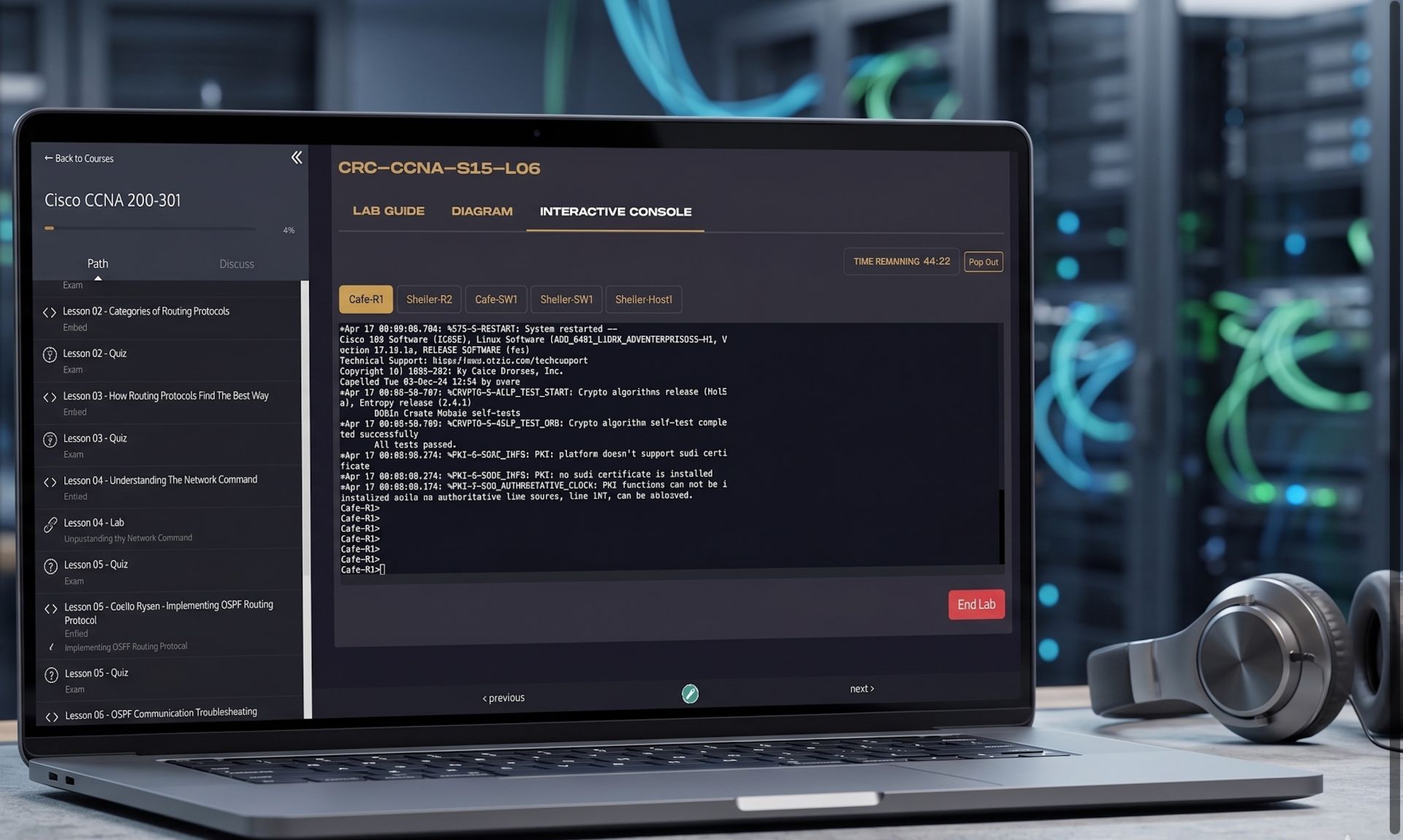
Training is powerful on its own, but real transformation happens when you apply what you learn by getting your hands on the keyboard and following along.
Empty space, drag to resize
With our labs, you'll work on:
  • Real Cisco operating systems (not simulations)
  • Real-world scenarios used in actual environments
  • An in-browser experience (no downloads, no setup)
Empty space, drag to resize

Cisco Labs powered by: